Wednesday, 3 August 2011

How to get a shutdown icon on Desktop

It is very simple to get a shutdown icon on your desktop.It could be useful for some lazy people and there is no problem knowing something.
Here are the steps:-
  • Right click on the desktop
  • Click new
  • Click shortcut
  • Enter location as “shutdown -s -t 00”
  • Click on next and enter desired name.
  • Click on finish.

Wednesday, 6 July 2011

Magic of disposable mails.


In frequent days disposable mail sites have become quite popular on which you can make a disposable email id.This email id will sustain only for the time limit you set for it. It is very useful if you want someone to send confidential data on your account since there is not a chance of stealth of information because the id will get removed automatically after the time limit. 

Monday, 4 July 2011

How to update your antivirus when offline?


OK we all know how important it is to update your antivirus. Antivirus not updated for long time could not stand before the new viruses, that is the reason why now virus definitions are released very regularly. The antivirus updates itself automatically when online but the problem arises for those users who have to update their antivirus offline.

The answer is by installing Anti-virus definitions.


What are antivirus definitions?
Latest antivirus definitions are commonly known as Antivirus Signature Database. This is some kind of information created by the Anti-virus company to detect the latest virus on your PC. Thus its always recommended to Update Antivirus Offline or Online.
You can download these definitions from the official site of the antivirus but some of the antivirus sites don’t provide these updates you can also download them from here
http://www.softpedia.com/get/Others/Signatures-Updates/ 


Wednesday, 29 June 2011

Download any video from YouTube in desired formats like 3gp.


Today after googling for couple of hours to know how to download any video from YouTube in 3gp and some other desired formats ,I came across  to several links and videos on YouTube and finally found my answer in one of the comments on a YouTube video(sounds a bit shocking  but trust me).
The answer was http://www.tubeminator.com.


It was simple enough for even a rookie. Just copy the video link and paste it in the box and click the START button. It will take a bit of time downloading your video and then you will be and then click to go to step 2.
Choose your desired format, resolution and you can even crop a part of the video if you like.
Then again it will again take some time to convert your video and you just have to click on download your video and this is it.
 Unfortunately you can only download three videos per day if you are not registered.
Please comment.

Monday, 23 May 2011

Installing Windows 7 from a USB Drive(With an .iso file)

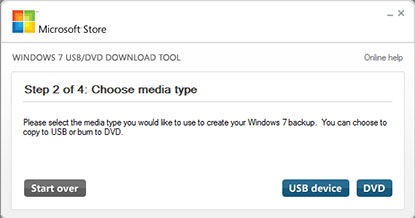
When you purchase Windows 7 from Microsoft Store, you have the option to download an ISO file or compressed files. The Windows 7 USB/DVD Download tool allows you to create a copy of your Windows 7 ISO file on a USB flash drive or a DVD. To create a bootable DVD or USB flash drive, download the ISO file and then run the Windows 7 USB/DVD Download tool. Once this is done, you can install Windows 7 directly from the USB flash drive or DVD.

 When you download the ISO file, you need to copy it to some medium in order to install Windows 7. This tool allows you to create a copy of the ISO file to a USB flash drive or a  DVD.

Steps to install Windows 7 from your USB flash drive or DVD:
Step 1-
Download and Install Windows 7 USB/DVD Download Tool.Link to Download the tool-
http://download.cnet.com/Windows-7-USB-DVD-Download-Tool/3000-18513_4-10972600.html

Step 2-
Run the program and browse the windows 7 iso image.


Step 3-
When the program asks you to choose media type,choose USB device.


Step 4-
It will automatically display your USB Device,if it does not click refresh and then click Begin copying.

Then it will start copying files to the usb device.
The copy of the ISO file that the Windows 7 USB/DVD Download tool creates is bootable. Bootable media allows you to install Windows 7 without having to first run an existing operating system on your machine. If you change the boot order of drives in your computer's BIOS, you can run the Windows 7 installation directly from your USB flash drive or DVD when you turn on your computer. Please see the documentation for your computer for information on how to change the BIOS boot order of drives.

Read more: Windows 7 USB/DVD Download Tool - Free software downloads and software reviews - CNET Download.com http://download.cnet.com/Windows-7-USB-DVD-Download-Tool/3000-18513_4-10972600.html#ixzz1NBrpLEhd


Wednesday, 18 May 2011

How do torrents work ?


Many a time a question arises in our mind that how do these torrents networks work?
Here's your answer!
Torrents are peer-to peer or p2p networks.

For example say if you want to download a movie(say it"x") and there are about 1000 more people downloading the same movie at the same time then in a server network,the server will be overloaded and people will get lesser speeds but in a p2p network the same file is fragmented or divided into many parts(say 1000 parts) and all the computers downloading the file are inter-connected.
So, what happens is that when you download that movie 1 piece will be going to each of them at first then these 1000 people will share these pieces among themselves and these people give  pieces of the same file to you,which will fastly download to your system at your full bandwith speed.

Basically - The file you want to download is broken up into small pieces, each piece is downloaded from multiple sources (seeds) and then reassembled on your computer. You get the download speed from both multiple sources and the fact you are downloading multiple file fragments at the same time.

Hence,you can get files much faster than downloading it from a single server.

The role of a torrent software like bitTorrent here is that it will take all those downloaded pieces and put them together into the file you downloaded.
Please comment.